Tools
Eighteen tools, sorted by the kind of work they do
Compliance tools handle schedules and reconciliations, with supported journals posting to Xero. Administration tools keep the practice running, and consulting tools help explain the numbers to a client.
- 7 compliance
- 5 administration
- 6 consulting
The practice job map
The whole toolkit, mapped to how a client job runs
A common client job moves from understanding the group through preparation, technical work and review to advice. Choose a tool to see where it helps.

Five stages, from compliance to advice
Watch a client job move through AccountKit
Keeps the practice runningBehind every job
Select any feature to see what it does.
- Compliance
- Administration
- Consulting
- Platform
Every one of the 18 tools, by category
Compliance and consulting tools are included in the base subscription. Administration capabilities vary by plan: the correspondence and registers expand on Professional; full Workflow and Knowledge Centre are on Practice.
Compliance tools
Reconciliations and schedules behind the accounts, calculated in AccountKit with supported journals posted to Xero.
- Account reconciler
Reconcile disbursement, suspense and clearing accounts through the year, linked back to source verifications.
- Amortisation scheduler
Build one schedule for a prepayment or other income or expense and apportion it across the year.
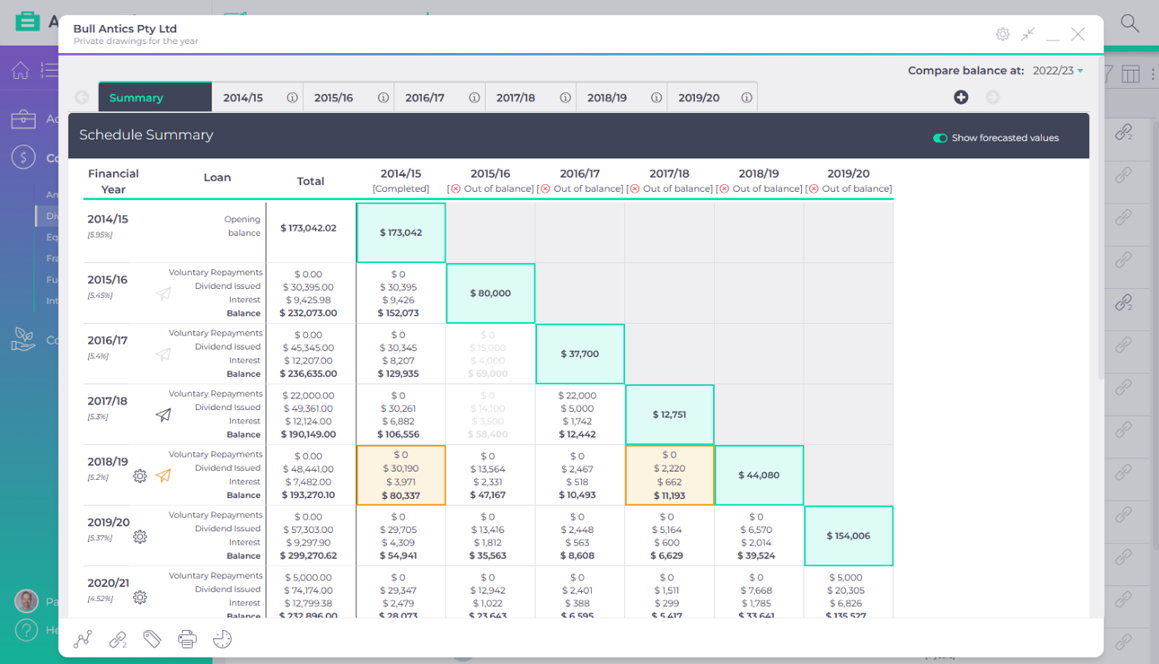
- Division 7A tool
Interest and minimum yearly repayments calculated across every loan, with a forecast for dividend planning.
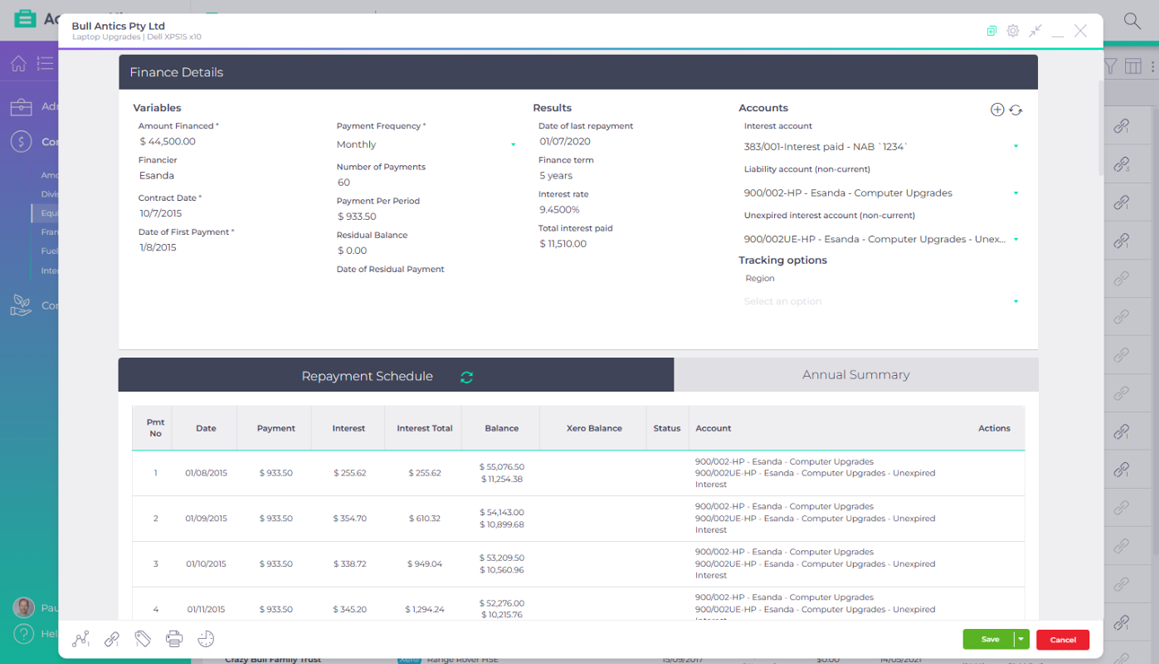
- Equipment finance
Regular or irregular finance schedules that post their entries and reconcile through the year.
- Franking account register
Franking account balances for every client company, tracked in one register.
- Fuel tax credit calculator
Each client’s fuel tax credit claim calculated per period, then rolled over for the next one.
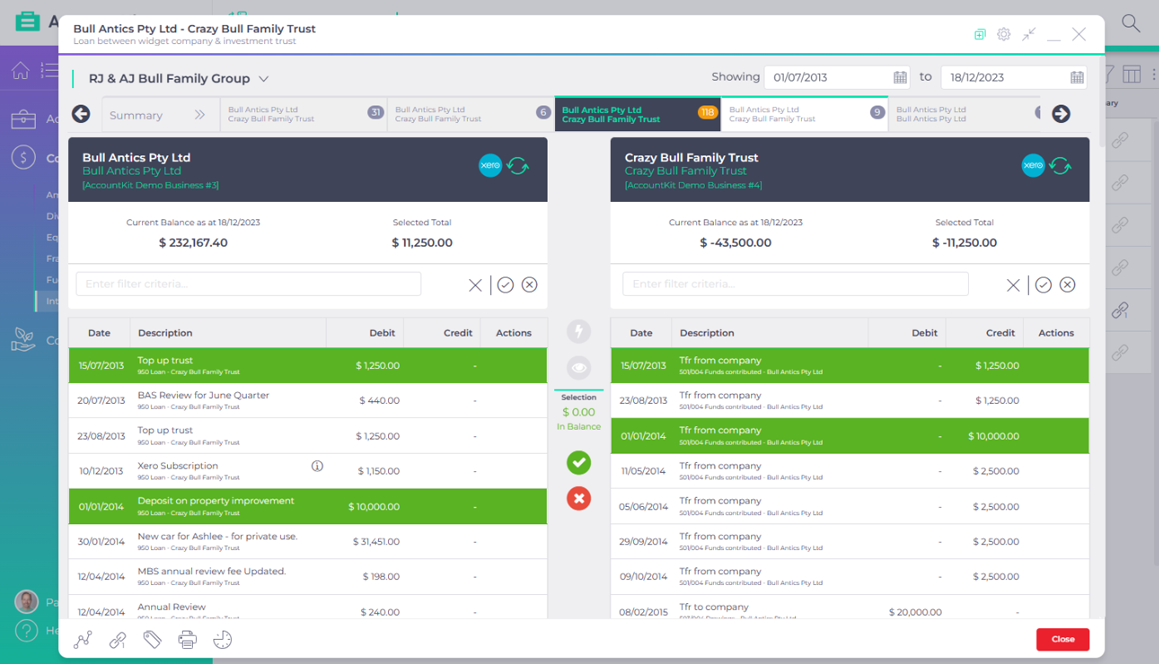
- Inter-entity loan tool
Entries matched between entities across the group, with the unreconciled balance journalled.
Administration tools
The registers and routines that keep the practice itself running, from the task list to the CPD log.
- Workflow
Every task, recurring job and reminder in one place, linked to the client or client group.
- Correspondence register
Calls, file notes, meeting notes, SMS and emails logged against the client, with practice-wide templates.
- Important items register
Where the wills, trust deeds and title certificates are, and who took them offsite.
- Knowledge Centre
Your internal processes, kept where the work happens and linked from workflow tasks.
- Professional development register
CPD hours, courses and certificates for the whole team in one view.
Consulting tools
Diagrams, calculators and graphs you can put in front of a client to start the next conversation.
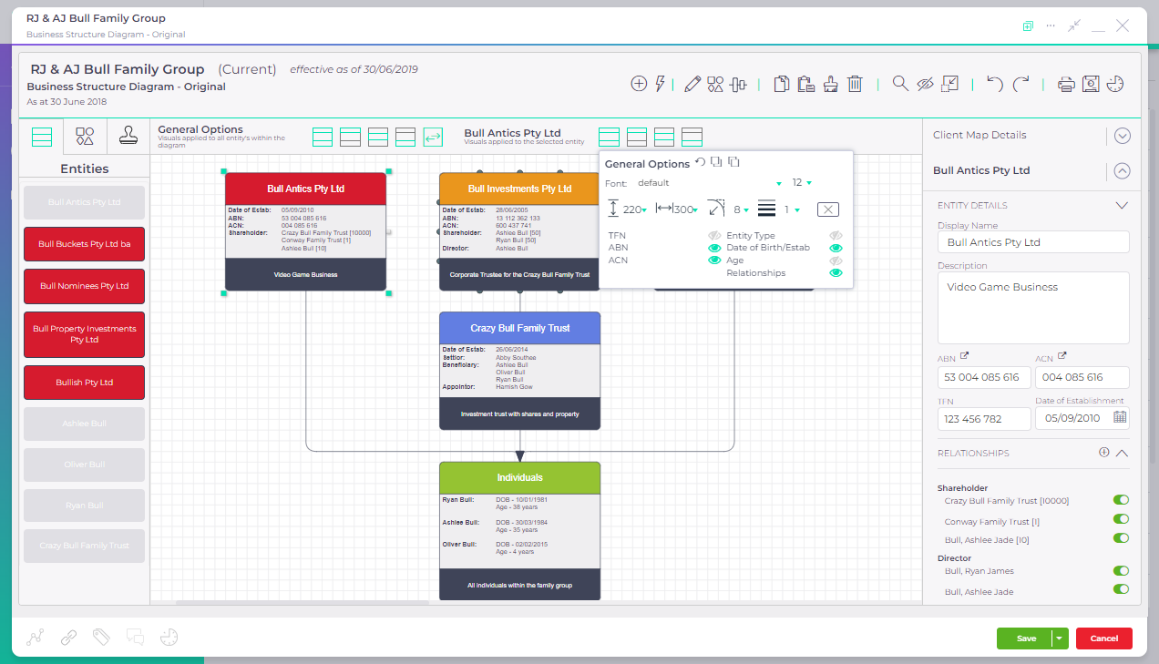
- Client mapping tool
Diagrams of client structures, software and processes, with client details kept in sync.
- Simple loan calculator
What a client will pay over the life of a loan, shown as one clear graph.
- Flexible loan calculator
Solve for any one loan variable, then build a schedule from the answer.
- Extra loan repayments
The time and interest extra home loan repayments save, graphed in your practice colours.
- Compounding super
How extra contributions could add up over a working life, to open the super conversation.
- Retirement calculator
Retirement outcomes from the client’s own circumstances, as a start to broader planning.
See them in motion
Explore the tools in action
Explore a client group, scrub a loan schedule or match two ledgers. Each tool page brings the work to life with an interactive example.
- Compliance
Division 7A tool
Interest and minimum yearly repayments calculated across every loan, with a forecast for dividend planning.Scrub the loan schedule - Compliance
Equipment finance
Regular or irregular finance schedules that post their entries and reconcile through the year.Watch the schedule build - Compliance
Inter-entity loan tool
Entries matched between entities across the group, with the unreconciled balance journalled.Watch the ledgers match - Consulting
Client mapping tool
Diagrams of client structures, software and processes, with client details kept in sync.Explore a client group
What firms say
Firms on the tools they rely on at month end and year end.
“We love what AccountKit brings to our tech stack. Technically, the professional team love the compliance and consulting features, and from an administrative point of view the feature rich CRM functionality helps to support our PM software quickly and efficiently. It has become our ‘source of truth’ for client data.”

Rhianan HendersonPractice Manager
“I just love this Xero add on. I only use it for the Equipment loans function It’s true what others are saying it ‘seamlessly’ integrates and posts to Xero so you can do those super amazing up to date management reports if that’s what you want. But even just basic compliance or when you need to pump out financials quick smart for the bank for those entities with multiple equipment loans, and high equipment asset turnover. Perfect. It saves me days and days of work.”

Katie SlukaKatie Sluka & Co
“I have been using account kit for about 3 months and already feel that I cannot live without it. The Fuel Tax Credit Calculator is my super favourite thing ever but I am giving the Correspondence Register and Inter-Entity Loan Tool a good bash too.”

Kerrie FloodPrincipal Accountant, Gilroy Barnes & Associates
The heart of your firm
Less time on schedules. More time for your clients.
See how AccountKit fits the work your firm does every month. Book a demo, or try the tools on your own client list.